

Eighteen months into running my site, I reread my early posts and found some were rough. Introductions wandered, advice was vague, and a few screenshots looked like they were taken on a different planet. That reaction tells you something useful: your standards moved, which means you learned something. Now the job is to turn that reaction into a repeatable process, because rereading and wincing doesn’t fix anything.

This is the method I am using to update old blog posts without blindly rewriting everything.
Why old posts make you wince, and why that’s a good sign
Your first posts were written before you knew what readers search for, how a post should be structured, or how your own voice sounds on the page. Wincing at them is normal. It does not mean the posts are worthless, and it does not mean you should delete them all.
Some old posts still earn visitors and links. Others are fine in substance and just look tired. A few really are bad. The point of an audit is to sort them so each post gets the work it deserves.
How I’m going to audit every post: keep, polish, rewrite or retire
Start with a spreadsheet. List every post with its URL, title, publish date, and a blank column for a decision. Then read each post against five questions:

- Does it answer one clear question a real reader would type into a search box?
- Is everything in it still accurate?
- Does it fit what the site is about now?
- Is it well written, or does it ramble?
- Does it look good, with sharp images and clean formatting?
Your answers give the decision:
- Keep: it passes all five. Leave it alone.
- Polish: the writing and facts hold up, but the visuals or formatting do not.
- Rewrite: the topic is right, but the execution, accuracy, or search focus is wrong.
- Retire: the topic no longer fits the site, or it overlaps with a better post. Delete it, or merge it into the stronger post and redirect the old URL.
Check your search and analytics data before you decide. A post that already brings in visitors deserves more care than one nobody reads.
The posts that need a full rewrite
A post goes in the rewrite pile when it targets the right topic but misses what the reader wanted. Typical signs are a thin answer, advice you would no longer give, outdated facts, or a structure that buries the point under three paragraphs of preamble.
Rewrite these from a fresh outline instead of editing line by line. Patching a weak structure leaves you with a weak post that has better sentences. Keep the same URL so existing links and search history stay attached to the page. If two old posts cover the same question, combine them into one stronger post and redirect the weaker URL to it.
Also add links to your newer posts while you are in there. Early posts often have none, and they are exactly where a reader should be sent onward.
The posts that only need better graphics
Some posts have solid writing and still look dated. Common causes include low-resolution screenshots, mismatched image styles, no featured image, missing alt text, and oversized files that slow the page.
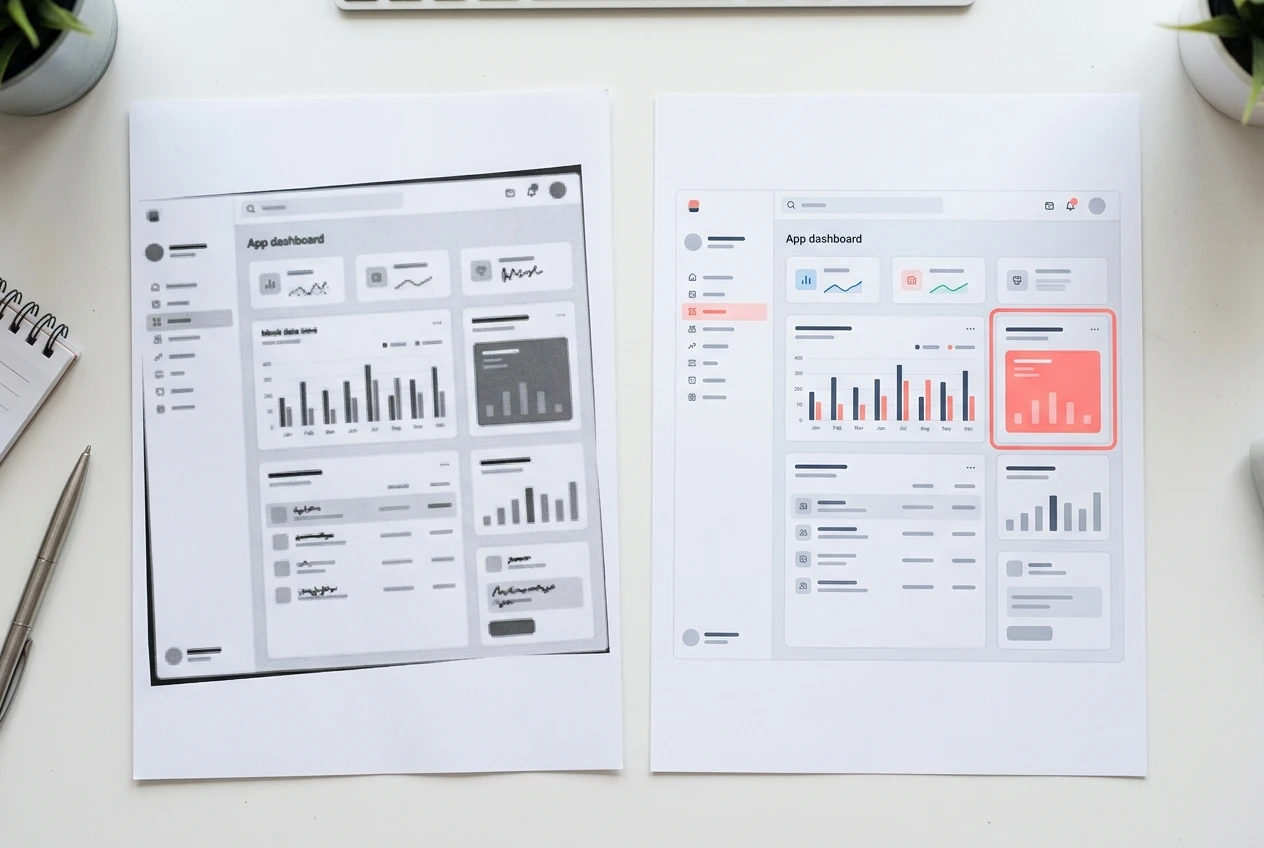
For these, leave the text mostly alone and fix the visuals:
- Retake screenshots of the outdated interface.
- Use one consistent style for headers and featured images.
- Add a useful image where a long block of text needs a break, such as a diagram, a comparison table, or a labeled screenshot.
- Write alt text that describes what the image shows.
- Compress large files.
This is the cheapest category of work, and it often improves a post more than people expect.
Fixing the site itself: navigation, menus, and layout
Individual posts only help if readers can find them and move between them. Your site has probably grown beyond the structure you built on day one, so review it as a visitor would.
- Menu: Does it match what the site covers today? Remove items that lead nowhere important, and keep the top level short enough to scan at a glance.
- Categories: Check that each post sits in a category that makes sense, and merge categories with only one or two posts.
- Homepage: A new visitor should see where to start within a few seconds.
- Layout: Check line width, font size, and spacing on a phone, since many readers will arrive on one.
- Internal links: Make sure each post links to related ones, so readers have a next step.
My order of attack and how I’ll know it worked
I do the site-wide fixes first because they affect every page at once. Next I retire and merge, which shrinks the list before I spend time on it. Then I rewrite, starting with the posts on my most important topics. Polishing comes last, since it is quick work that can fill gaps between rewrites.
To judge whether it worked, I will note each post’s search impressions, clicks, and time on page before I touch it, then check again a few weeks later. For the site-wide changes, I will watch whether readers reach my key pages and move on to a second post. Search results can take time to show, so I will compare trends instead of reacting to single days.
Tell us in the comments: which of your own older posts makes you wince the most, and what’s the first thing you’d fix?